





Efficiency and individualisation are paramount in the gaming world. The charm of a personalised gaming PC is in the unique combination of power, adaptability, and personalisation it offers. A bespoke build gives you the freedom to choose the precise components that align with your budget, aesthetic choices, and performance expectations, unlike off-the-shelf solutions. The sheer number of hardware choices, technological requirements, and industry trends might make it difficult to know where to start. If you want a gaming PC that’s just right for you, this guide will help you narrow down the options.
Identifying Your Objectives in Gaming
Knowing your end goal is the first step in building a custom gaming PC. Think about the games you play the most and the settings you want to achieve in terms of graphics. While large open-world games may gain from improved texture rendering and more memory capacity, competitive first-person shooters necessitate low latency and fast frame rates. The components you should prioritise will be determined by your focus: high refresh rate gaming, 4K resolution, or virtual reality preparation.
Making the Correct Processor Selection
Many people think of the central processing unit, or CPU, as the “brain” of their personal computer. It is the determinant of your system’s ability to multitask and process instructions efficiently. Video games with complex artificial intelligence systems, extensive physics computations, or expansive open worlds require a powerful central processing unit (CPU). Having a CPU with strong single-core speed guarantees smooth gaming, while modern games benefit from multi-threaded and multi-core CPUs. You must balance the processing power of your CPU with the visual demands of the game, as not all games are CPU-bound.
Issues with Graphics Cards
In terms of visual performance, the graphics processing unit (GPU) is the brains of any bespoke gaming PC. All of the visual elements, including textures, lighting effects, animations, and in-game images, are primarily rendered by this component. Your expectations for resolution and frame rate are directly proportional to the power of your GPU. Obtaining high frame rates in 1080p gaming may be possible with a mid-range graphics processing unit. A high-end graphics card is essential for 1440p or 4K gaming, as well as for ray tracing and high-quality shaders. Understanding your objectives and finding a balance between performance and money is crucial, as GPU costs and availability might change.
RAM: Just How Much Is Necessary?
While it may not get much attention, Random Access Memory (RAM) is crucial to how well a computer runs games. Although 16 GB of RAM is more than plenty for most current games, 32 GB or more may be necessary for some games and multitasking situations, such streaming while gaming. Your RAM’s latency and speed are also important. In CPU-intensive games, faster RAM can somewhat boost performance, but here is where the law of diminishing returns comes into play. The trick is to not spend more than necessary in pursuit of performance improvements you might never see.
Modular Data Storage and Quick Game Launches
Rapid advancements in storage technology have led to solid-state drives (SSDs) being included as standard in the majority of bespoke gaming PCs. Faster startup speeds and much quicker loading times for game materials and settings are both benefits of solid-state drives (SSDs) over conventional hard drives. Having a smaller solid-state drive (SSD) for the OS and important games and a bigger hard disc drive (HDD) for general storage is a popular dual-drive configuration. It’s worth exploring NVMe SSDs, which use the PCIe interface, if your motherboard supports them. They offer even quicker performance than SATA SSDs.
Features and Compatibility of Motherboards
Your custom gaming PC’s motherboard is the central nervous system that links and communicates with all of the other parts. Make sure the motherboard you choose is compatible with the processor, memory, and graphics processing unit (GPU) you want to use. In terms of extension capacity, networking choices, audio output quality, USB ports, and PCIe slots, there is a great deal of variation. If aesthetic control and improved cooling are important to you, you may want to look at motherboards that include RGB headers. Case choice and airflow within are affected by the form factor as well. Mini-ITX, Micro-ATX, and ATX boards differ in size and layout.
Efficiency in Power Supply
Your custom gaming PC’s stability and lifespan depend on the power supply unit (PSU), which isn’t exactly a flashy component. Your system will receive clean, steady power from a dependable PSU. In order to accommodate potential system strain and future upgrades, you should select a power supply that is at least 20-30% more powerful than your system really needs. For the best results, try to get a model that has an 80 PLUS Gold, Platinum, or Bronze certification for efficiency. As an added bonus, modular power supply streamline cable management, which in turn improves case ventilation and aesthetics.
Performance-Maximizing Cooling Systems
With strong central processing units and graphics processing units (GPUs) producing a great deal of heat, heat management becomes an extremely important issue in gaming PCs. Depending on your budget and personal preferences, a custom gaming PC might use either air cooling or liquid cooling. Although high-end air coolers are usually more than enough for most gamers, liquid cooling has the advantage of being quieter and can enhance the capacity for overclocking. The case’s design is important since it controls airflow and allows for different combinations of fans and radiators. Keeping your system at a low temperature has several benefits, including improved performance and longer component life.
Why the PC Case Matters So Much
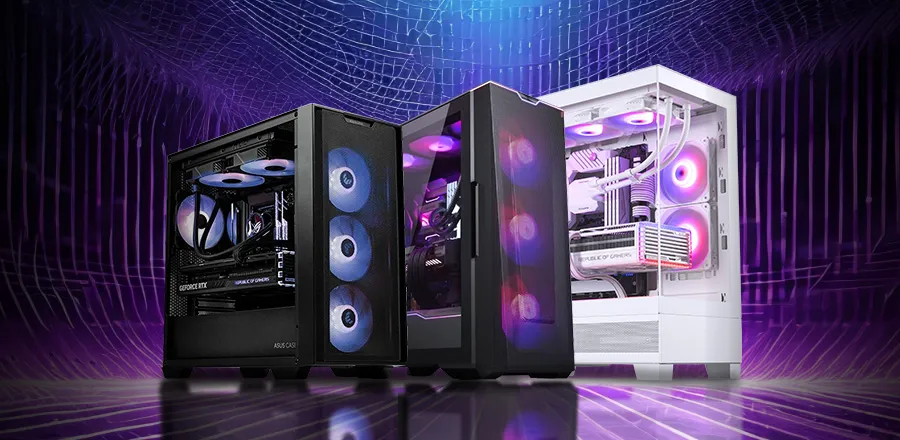
Aesthetics shouldn’t be overlooked, even while performance is paramount. Your bespoke gaming PC’s outside shell, or case, affects things like ventilation, noise, and component accessibility. There are cases to suit every aesthetic preference, whether it is a small footprint, a completely RGB-lit arrangement, or a minimalist design. Think about the number of drive bays you’ll need, the ease of building into the case, and any extras like dust filters, cable management choices, or tempered glass panels that the case may provide.
Connecting Devices and Displays
To get the most out of your bespoke gaming PC, you need high-quality accessories. Choosing the right monitor is crucial; using a strong GPU with a 60Hz display can severely restrict your gameplay. If you want a monitor with a fast refresh rate for competitive gaming or a high resolution for immersive storytelling, you should look for one that matches your performance goals. You may customise your keyboard and mouse to make extended sessions more comfortable and responsive, and you can add more immersion to your gaming environment with audio choices.
Making Your Project Future-Ready
In a world where technology is always improving, what is considered state-of-the-art today can be considered average tomorrow. Plan ahead of time when you build your own gaming PC. Invest in components that can keep up with your performance demands even in the future. Builds with additional RAM slots on the motherboard, CPUs with good future support, and power supplies with ample room for future GPU upgrades tend to last longer. There is no such thing as a completely future-proof computer, but careful planning can put off the inevitable need for a system upgrade or rebuild.
Creating a Budget That Does Not Neglect Performance
Keeping costs down without sacrificing performance is a major difficulty when building a bespoke gaming PC. Spending too much on a showy part can force you to cut corners elsewhere. Consider your gaming habits when deciding which components to prioritise for optimal performance. The GPU and CPU should be given additional resources if you play first-person shooters. Additional RAM and storage space could be useful for open-world role-playing games. The key to getting the most out of your investment is striking a balance between performance and expense.
Personalisation and Eye-Catching Design
Your personalised gaming PC is an expression of who you are, not merely a piece of hardware. To make their projects stand out, many builders love to use RGB lighting, themed colour schemes, and accessories. Although they have no bearing on the machine’s functionality, these add to the pleasure of owning and operating it. Whatever you want to do, from understated details to elaborate light displays, it should all seem like your setup. Verify that the motherboard and case you’re considering can accommodate the personalisation options you’re considering.
In summary,
Research, self-awareness, and creative vision are the three main components of a custom gaming PC. You can put together a system that gives you the precise gaming experience you want if you know what you want and consider your budget and performance needs. Each component, from the bare bones of your graphics processing unit (GPU) to the polished outside of your case, adds up to a one-of-a-kind rig. A personalised, powerful, and future-proof gaming experience is the end result whether you construct it yourself or have a professional assemble it from your chosen components.